The Journey of a Request: Understanding the WordPress AI Architecture
- Introduction: A New Era for WordPress
WordPress 7.0 represents a fundamental shift in the CMS’s evolution, positioning it as the architectural foundation for an AI-driven web. Historically, integrating artificial intelligence meant writing hard-coded, proprietary logic to interact with specific Large Language Models (LLMs). This fragmented approach created technical debt, forcing developers to rebuild integrations every time a provider updated their API or a more performant model emerged.
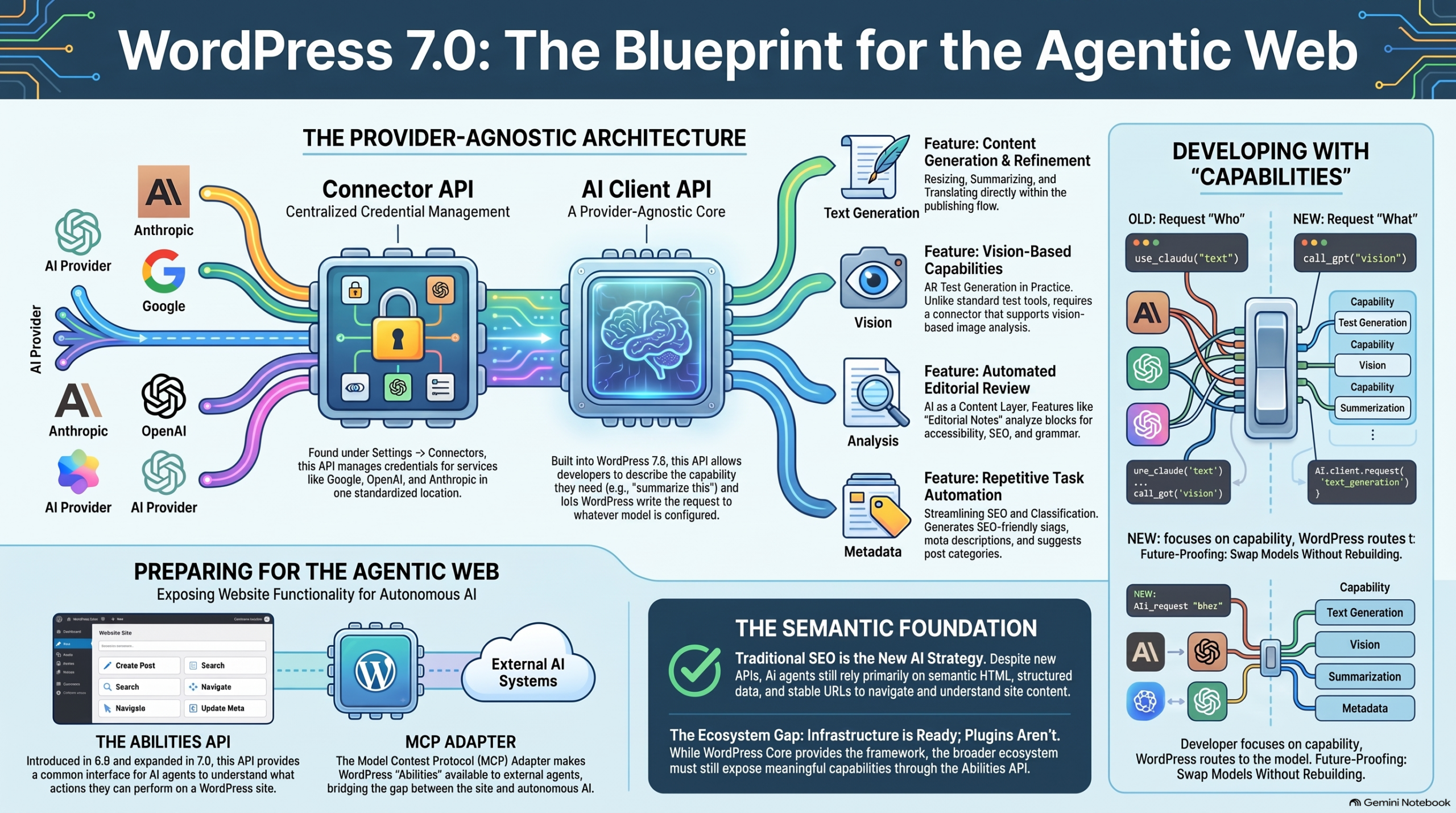
To solve this, WordPress 7.0 introduces a standardized, provider-agnostic architecture. By decoupling the user-facing feature from the underlying service provider, WordPress ensures that AI integration is no longer a series of fragile hacks, but a core system capability. For you as a developer, this means unparalleled durability: you can build AI-powered features once, confident they won’t break when the industry’s preferred model shifts. This architecture allows you to focus on the user experience while WordPress manages the complexities of LLM communication.
To understand how this ecosystem functions, we must first examine the specific components that facilitate this standardized exchange.
- Meet the Cast: The Three Pillars of WordPress AI
The WordPress AI architecture relies on three distinct layers to manage the flow of data safely and efficiently. These components ensure that no single plugin needs to own the entire stack of communication, authentication, and execution.
Entity Name Role in the Process Simple Analogy
The WordPress AI Client A built-in, provider-agnostic API that standardizes “capabilities” (e.g., text generation) rather than specific models. The Translator: It converts a generic request into a universal language the system understands.
The Connector API The central manager for routing and secure credential handling (API keys) to external services. The Bridge: It provides a secure, governed pathway from the WordPress environment to the external web.
The AI Provider The external LLM engine (Anthropic, Google, or OpenAI) that performs the computational work. The Brain: It processes the prompt and generates the final output based on the requested capability.
Understanding these roles is essential for visualizing how a single user interaction triggers a complex, secure chain of events across the system.
- Step-by-Step: The Life Cycle of an Image Generation Request
To see this architecture in practice, let’s trace the journey of an image generation request within the block editor. This process is powered by the AI Plugin—a “feature plugin” used by the Core AI team to test these capabilities at scale, much like Gutenberg once did for the editor.
- The Spark: A user enters a prompt (e.g., “A high-resolution landscape of a neon-lit forest”) into the Block Editor.
- The Request: The AI Plugin does not call an external service directly. Instead, it asks the AI Client for the “Image Generation” capability. This is a critical distinction: the plugin developer doesn’t need to know which model is active; they only need to declare what the feature requires.
- The Handshake: The AI Client receives the request and passes the payload to the Connector API.
- The Translation: The Connector (managed via Settings → Connectors) identifies the active provider—such as OpenAI, Anthropic, or Google—and routes the request using the securely stored credentials. This eliminates the need for developers to build custom settings screens for every plugin.
- The Creation: The AI Provider processes the prompt and returns the generated image data back through the Connector and the AI Client.
- The Result: The image is injected directly into the publishing workflow, providing a seamless experience where the user never leaves the WordPress interface.
This capability-based approach is the secret to the system’s flexibility, allowing the site owner to swap the “brain” without breaking the “body.”
- The Power of “Capabilities” over “Models”
By focusing on “capabilities” (what the AI can do) rather than “models” (the specific version of an LLM), WordPress provides a robust development framework that prioritizes long-term stability.
- Durability: Features remain functional even if a specific model is sunset or deprecated. As long as the provider offers the required capability, the site continues to operate without code changes.
- Flexibility: Site owners can easily transition between providers (e.g., switching from Google to Anthropic) via the Settings screen. The application logic remains untouched because it interacts with the AI Client, not the provider’s unique API.
- Simplicity: Developers are spared the burden of building fragmented API key management and settings interfaces. A single connector handles site-wide credentials, reducing the attack surface and simplifying the user experience.
“The AI Client is a provider-agnostic API built into WordPress. Instead of requiring every plugin to implement its own integration… developers can describe the capability they need and let WordPress route the request to a compatible model.”
This standardized internal workflow is the first step in a broader strategy to prepare WordPress for the “Agentic Web.”
- Expanding the Horizon: Introduction to the Agentic Web
The Agentic Web represents a future where AI agents don’t just index text for search engines, but actually interpret site structure and perform actions—like executing a booking or synthesizing data—on behalf of a user.
WordPress is building the infrastructure for this shift through two key tools:
- The Abilities API: Originally introduced in version 6.9 and significantly expanded in 7.0, this API provides a standardized interface for exposing what a site is “able” to do to external systems.
- The MCP Adapter: This tool allows these “Abilities” to be understood and utilized by external AI systems via the Model Context Protocol.
The Ground Truth for Developers: While these new APIs are powerful, the “Ground Truth” for agentic readiness remains rooted in foundational best practices. In fact, research suggests agents often prioritize standard web structures over experimental ones. Developers must focus on:
- Stable URLs and Semantic HTML: These remain the primary way agents parse and understand content.
- Structured Data: Essential for agents to consistently identify variables like prices, dates, or authors.
- Experimental Restraint: Techniques like llms.txt, Markdown versions of pages, or agent-specific endpoints are currently experimental. They should not be prioritized over the established standards of accessible, well-organized HTML.
Currently, the WordPress core is ready for this future, but the ecosystem is still catching up. There is a significant opportunity for developers to begin exposing meaningful site capabilities through the Abilities API to make their plugins “agent-ready.”
- Conclusion: Your Foundation for the Future
The AI plugin is far more than a collection of generative tools; it is a working demonstration and a feature-plugin testing ground for a durable architectural foundation. It proves that by standardizing how we interact with LLMs via standardized endpoints, we can build a more resilient and maintainable web.
The architecture introduced in WordPress 7.0 ensures that your site is prepared not just for today’s AI models, but for the evolving agentic era. To see this in action, I encourage you to navigate to your own Settings → Connectors screen. Explore the providers available, and consider how you can utilize the AI Client to build features that will stand the test of time.